
Promotion on your own website or blog
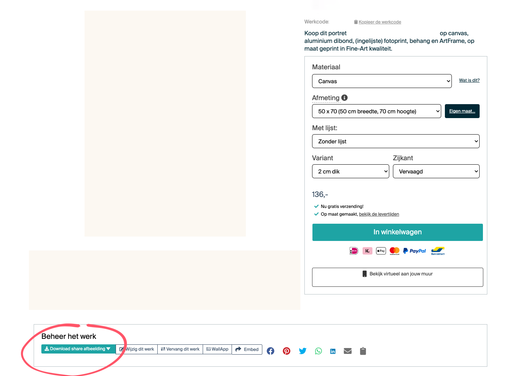
Use visuals from the roomtool
Perfect for your website or social media
On your artwork’s page, you'll find several tools to create a beautiful visual of your own work in an interior setting. You’ll find the roomtool in the menu under your artwork. Click the green button ‘Download share image’. Here, you can choose a format based on the social media platform you want to share it on for example, an Instagram story. Pick an interior that matches your work and share the image on your website or socials.
Why you should feature your Art Heroes shop on your website
Did you know that you receive a higher commission when you link to your Art Heroes shop from your own website? In that case, we only charge a 15% service fee instead of 30% when a customer buys your work.
By linking to your artworks, you not only increase your potential earnings but also offer your customers an easy way to view and purchase your work.
Where can I find the links?
You can link to your shop in several ways.
Link to your own shop
Use the link: https://artistname.artheroes.com. Just replace artistname by the name of your shopwith the name of your shop.In your dashboard under Marketing, scroll all the way down the page to find the direct link to your shop, ready to copy.
Link to an artwork
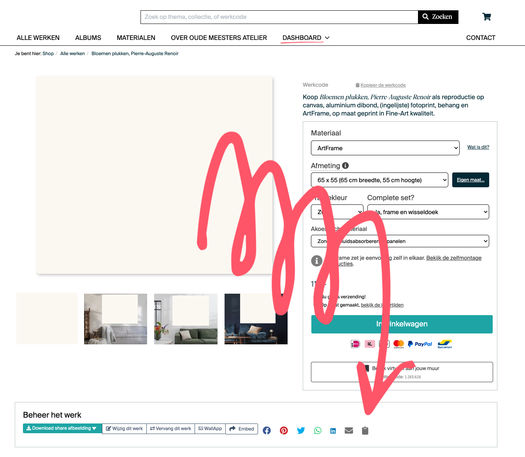
Go to the page of your artwork or album. In the menu below your artwork, you'll see a clipboard icon on the far right. Click it to copy the link to your work.
The link to your artwork looks like this:
https://www.artheroes.com/en/shopartwork/title-artwork/artcode
Perfect for sharing on social media like Instagram and Facebook, or on your website!
How do I add a link to my own website?
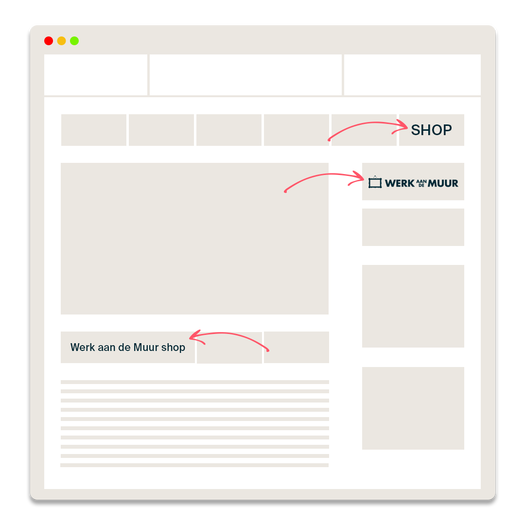
It’s a good idea to link to your shop in multiple places on your own website. For example, you can add a button in several spots that links to your shop. You could also add a logo of Art Heroes or Art Heroes to the page
How to showcase your work on social media
Social media, like Instagram and Facebook, are online spaces where people share stories, photos, and experiences. They’re important because they help you connect with many people at once and show your art to the world.
1. Use the room tool to create a great visual in a stylish interior
2. Add a clear call to action to your post
3. Share it with all your friends and family
4. Post new content regularly
Didn't find your question?
Go to the forum and ask your question! Among thousands of artists, there is always someone online who knows the answer.